Chino: A Typeface That Brings Skeletons Out of the Closet
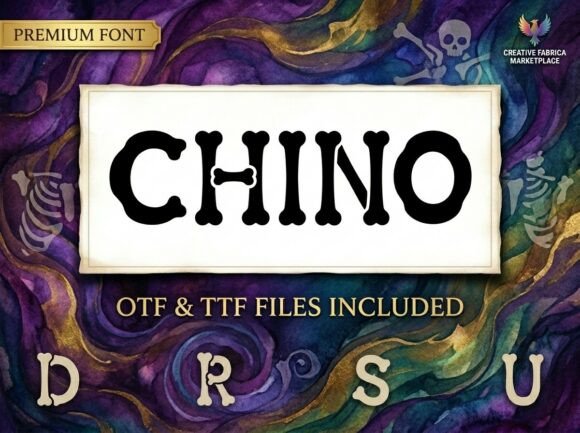
There's a moment in every designer's life when a project demands something beyond the ordinary—when a standard serif or clean sans serif just won't capture the spirit you're after. Maybe you're crafting a Halloween party invitation that needs genuine personality, or perhaps you're building a brand identity for a quirky pet shop that specializes in gourmet dog treats. In those moments, a font like Chino can transform a forgettable design into something people actually stop and notice. This whimsical display typeface takes the human skeleton as its muse, constructing every letterform from stylized bone shapes with rounded joints and organic, marrow-inspired curves. The result is a typeface that feels simultaneously spooky and playful, anatomical and approachable.
A Display Font with Real Character
What makes Chino stand out in a sea of creative fonts is its commitment to a single, cohesive visual concept. Each character—from uppercase A to lowercase z—is carefully built from bone-like structures. The joints where strokes meet feel organic rather than mechanical, and the overall silhouette carries a bold, high-contrast weight that ensures your message doesn't get lost in the novelty. This isn't a font that sacrifices legibility for style. The rounded terminals and consistent stroke rhythm mean that words remain readable even at display sizes, which is exactly what you need from a premium font designed for headlines, logos, and eye-catching graphic elements.
Think about how many display fonts promise personality but deliver chaos. Chino avoids that trap by maintaining a disciplined structure beneath its playful exterior. The bone shapes aren't random—they follow the same proportional logic you'd find in a well-crafted serif font or sans serif font, just expressed through a completely different visual language. This balance between whimsy and structure is what separates a genuinely useful design asset from a novelty that sits unused in your font library.
Where This Typeface Truly Shines
Let's talk practical applications, because a font is only as valuable as the projects it elevates. Chino naturally excels in Halloween-themed work—party invitations, haunted house flyers, seasonal social media campaigns—but limiting it to October would be a missed opportunity. Consider a children's museum creating signage for a dinosaur exhibit. Or a craft brewery developing packaging design for a bone-dry IPA with a skeleton mascot. Or a podcast about true crime history that needs a distinctive logo design that communicates both intrigue and approachability.
The font works beautifully across a surprising range of contexts:
- Brand identity projects for businesses with a playful, slightly edgy personality—think tattoo parlors, escape rooms, or vintage curiosity shops
- Social media graphics where you need instant visual impact in a crowded feed
- Editorial design for book covers, magazine features, or blog headers dealing with adventure, mystery, or historical themes
- Merchandise like t-shirts, tote bags, and stickers where a single word or short phrase needs to carry the entire design
- Web design hero sections and landing pages that want to make an unforgettable first impression
- Pirate-themed events, theatrical productions, and creative educational materials
The key insight here is that Chino isn't just a "spooky font." It's a font with anatomical charm and lighthearted mystery—qualities that resonate far beyond seasonal design work. A pet brand using this typeface signals that it doesn't take itself too seriously while still investing in professional visual communication.
Pairing Chino with Other Fonts
Every creative font needs a partner. Because Chino carries so much visual weight and personality on its own, pairing it thoughtfully is essential for maintaining readability and professional presentation. A good rule of thumb: let Chino handle the headlines, the hero text, the single words that need to pop, and pair it with something quieter for body copy.
A clean sans serif font like a geometric or humanist style works exceptionally well. The simplicity of the companion font gives Chino room to breathe while ensuring longer paragraphs remain easy to read. If your project leans more editorial or classic, a neutral serif font can create an interesting contrast—the structured formality of traditional typography against Chino's organic, bone-inspired curves creates visual tension that keeps readers engaged.
Avoid pairing Chino with other highly decorative typefaces. Two competing personalities in the same layout creates visual noise rather than harmony. Think of font pairing like casting a play: you need a strong lead and a reliable supporting actor, not two leads fighting for the spotlight.
Practical Considerations Before You Commit
Before integrating any new typeface into your workflow, a few practical steps will save you headaches down the road. First, always test the font in context. Type out the actual words your project requires—not just the alphabet—and see how specific letter combinations look. Certain character pairs in decorative fonts can create awkward spacing or unintended visual effects. Chino's consistent construction minimizes this, but testing is always worthwhile.
Second, review the included font styles and character set. Does it include the punctuation and numerals you need? Are there alternate characters or ligatures that could enhance your design? Understanding the full capabilities of a typeface before you start designing prevents mid-project surprises.
Third, think carefully about commercial licensing. If you're creating work for clients, selling merchandise, or using the font in marketing assets that generate revenue, you need a license that covers commercial use. This isn't just legal housekeeping—it protects both you and the type designer who created the work. Most reputable font marketplaces make licensing terms transparent, so take five minutes to read them.
Finally, consider your audience. A font that delights a twenty-something creative professional might confuse a sixty-year-old executive. Chino speaks to people who appreciate personality and craftsmanship in design—audiences that skew toward creative industries, entertainment, lifestyle brands, and cultural institutions. If your target demographic values tradition and conservatism above all else, this particular typeface might not be the right fit, no matter how well-crafted it is.
Typography as a Branding Decision
Choosing a font isn't just an aesthetic decision—it's a strategic one. The typography you select for a brand, a product, or a campaign communicates values before a single word is read. Chino communicates creativity, humor, attention to detail, and a willingness to stand apart from the crowd. For small business owners and entrepreneurs building a brand identity from scratch, those qualities can be powerful differentiators.
Imagine two competing Halloween pop-up stores. One uses a generic, freely available spooky font that appears on hundreds of other seasonal designs. The other uses a carefully chosen premium font like Chino, paired with a complementary body typeface and a thoughtful color palette. The second store's materials feel intentional, crafted, and memorable. That impression translates directly into audience engagement—people share designs that surprise them, tag brands that make them smile, and return to businesses that feel like they care about the details.
This is the real value of investing in quality modern typography. It's not about the font itself—it's about the response it creates. A well-chosen typeface improves visual consistency across every touchpoint, strengthens brand recognition over time, and signals to your audience that you take your craft seriously enough to get the small things right. Whether you're designing a one-off poster or building a comprehensive brand system, the fonts you choose are doing quiet, constant work on your behalf.
Chino brings that work to life with a skeleton's grin and a designer's precision. For the right project, that combination is exactly what's been missing from your toolkit.